

You edited a translation, compiled the PO file into an MO file, uploaded it, and your site still shows the old text. On WordPress 6.5 and later, the most likely reason is that WordPress is not reading your MO file at all. A PHP translation file with the same name sits next to it, and WordPress prefers that one.
This guide compiles WordPress PO files into MO files with three tools. It also covers the four reasons a correct MO file still changes nothing on screen: the PHP file, a fuzzy flag, a wrong file name, and strings that come from JavaScript.
- Which file WordPress actually reads
- Compiling with msgfmt or Poedit
- Compiling with WP-CLI, and the PHP file beside it
- Where the file goes, and what overwrites it
- Strings marked fuzzy never reach the site
- The plural line in the header
- Text from JavaScript needs a JSON file
- Verification
- AIOWS Language Compiler
- FAQ
- Sources
Which file WordPress actually reads
You will meet three file types that share one name and do three different jobs:
| File | Who reads it | What it is |
|---|---|---|
my-plugin-de_DE.po | You, and editors such as Poedit | The text source. WordPress never reads it. |
my-plugin-de_DE.mo | WordPress | The compiled binary catalogue. |
my-plugin-de_DE.l10n.php | WordPress 6.5 and later | The same catalogue as a PHP array, faster to load. |
When both compiled files exist, WordPress 6.5 and later loads the .l10n.phpfile and ignores your .mo. Language packs you download from WordPress.org now ship both. So if you compile only an MO file and a PHP file of the same name is already there, your edit stays invisible.
You have two ways out. Compile the PHP file as well, which the WP-CLI section shows. Or delete the stale .l10n.php, after which WordPress falls back to your MO file. If the file is right and the text still does not change, plugin translations not showingcovers the causes outside the file.
The test site for this article showed it step by step. A .moand its .l10n.phpwere built from the same PO file, and your page showed that text. After one string changed and only the .mowas rebuilt, the page still showed the old text. Once wp i18n make-phpregenerated the PHP file, the next reload showed the new one.
Compiling with msgfmt or Poedit
msgfmtis the GNU gettext compiler. You will find it on most Linux servers and in Git for Windows:
msgfmt --check --statistics -o my-plugin-de_DE.mo my-plugin-de_DE.po--checkvalidates your header and your format strings, such as %sand %d, against the original text. --statisticstells you how many strings are translated, fuzzy and untranslated. Read that line. It tells you before you upload whether the file contains what you think it contains.
In Poedit, saving your PO file writes the MO file beside it by default. In Poedit 3.10 on Windows and Linux you find the setting under File> Settings…> General, in the Editing group: “Automatically compile MO file when saving”. On a Mac it sits in the Poedit menu’s settings.
Neither tool writes the .l10n.phpfile for you.
Compiling with WP-CLI, and the PHP file beside it
WP-CLI’s i18n commands compile both formats:
wp i18n make-mo  wp-content/languages/plugins/my-plugin-de_DE.po
wp i18n make-php wp-content/languages/plugins/my-plugin-de_DE.po
Each command writes its file next to your source unless you give a destination. Run both after every edit, and the stale-PHP-file problem above cannot happen to you. But clear your fuzzy flags first: both commands keep fuzzy entries, as the fuzzy section below shows. make-phparrived in WP-CLI 2.10.0 and make-moin 2.5.0. Run wp cli versionif either command is missing.
On the test site, WP-CLI 2.12.0 answered each command with one line, Success: Created 1 file.
Where the file goes, and what overwrites it
You cannot choose the name. It is the plugin’s text domain, a hyphen, the locale, the extension. my-plugin-de_DE.moworks. my-plugin-de.moand de_DE.modo not. Find the text domain in the plugin’s main file header, on the Text Domain:line.
WordPress looks in wp-content/languages/plugins/(themes: wp-content/languages/themes/) before the plugin’s own languagesfolder. If you put a file there, it wins.
That is also the folder your automatic translation updates write to. When WordPress.org ships a newer language pack for that plugin, your file of the same name is replaced. Your edits are gone, and nothing tells you.
If you maintain your own translation, keep a copy of your PO file outside wp-content/languages/. To see what is in that folder before you add to it, scan and manage WordPress language files. Then you can recompile it after an update. A translation plugin that loads from its own protected folder is the other route.
Strings marked fuzzy never reach the site
A fuzzy entry is one your editor guessed, or one that changed in the source. It carries a #, fuzzycomment in your PO file. Poedit shows it to you as needing work.
msgfmtleaves fuzzy entries out of the MO file unless you add --use-fuzzy. So your fully translated file can still show English on screen for every fuzzy string. --statisticsgives you the fuzzy count.
Clear the fuzzy flag after you have checked the translation, then compile again. Do not compile with --use-fuzzyto make the count look better. A fuzzy entry is fuzzy because nobody has confirmed it yet.
wp i18n make-modoes not work that way. On the test site, WP-CLI 2.12.0 wrote the fuzzy entry into the MO file as a normal translation, and so did wp i18n make-php, and your screen showed the unconfirmed text. msgfmtleft it out. If you compile with WP-CLI, clear or empty every fuzzy entry you have not checked before you run it.
The plural line in the header
Your PO header carries one line that changes how WordPress picks a translation:
"Plural-Forms: nplurals=2; plural=(n != 1);\n"For German you use n != 1. For Turkish, WordPress.org uses nplurals=2; plural=(n > 1);. If you start a PO file by hand, copy the header from an existing translation of the same language. With the wrong formula, “1 comment” and “2 comments” can swap or collapse into one form, and msgfmt --checkwill not always catch it.
Text from JavaScript needs a JSON file
The strings you see in the block editor, and in plugins that render their screens in JavaScript, are not read from your MO file. They come from JSON files named my-plugin-de_DE-, one per script.
If the PHP-side text is translated and a button in the editor is not, you are looking at this. wp i18n make-jsonbuilds those files for you from the same PO file.
Verification
| Check | Expected |
|---|---|
msgfmt --check --statisticson your PO file | No errors. The fuzzy and untranslated counts are the ones you expect. |
List the folder: .moand, if present, .l10n.php | Both have a modification time after your edit. A PHP file older than your MO file is the stale-file trap. |
| Open a screen that uses a string you changed | Your new text. |
| Mark one string fuzzy, compile, and reload that screen | Must still show the original English text.If it shows your guess, the compiler included fuzzy entries. |
The fourth row is there to prove that the compiler respects the fuzzy flag. A check whose every row passes only tells you that your happy path works. This one tells you that an unconfirmed translation cannot reach your visitors by accident.
Run it with the tool you actually use. msgfmtpasses it, and so does AIOWS Language Compiler with either of its compilers. A compiler that ignores the fuzzy flag fails it. On the test site, msgfmt1.0 passed, and WP-CLI 2.12.0 failed with both make-moand make-php.
How AIOWS helps:
AIOWS Language Compiler
Language Compiler is the compiler for AIOWS’s own translations. It is not a general PO editor for your other plugins, and the limits below say exactly where that line is.
It compiles where AIOWS reads.It turns the PO files in your AIOWS plugin’s languagesfolder into MO files, one locale at a time or all at once with Compile All Locales. It uses GNU msgfmtwhen your server lets PHP run it, and its own compiler when it does not. Both leave your fuzzy entries out, as msgfmtdoes, so an unconfirmed translation never reaches your screens. AIOWS ships no .l10n.phpfile for its own text domain, so the stale-PHP-file trap above does not apply to these files. WordPress reads the MO file the module writes for you.
It shows you what is missing before you compile.The Scan tab compares the plugin’s code with its PO files. It reports how much of the AIOWS interface is translated, and it lists empty and duplicate entries. An empty entry compiles without an error and still shows English, so read this list first.
It takes your edited file.Upload / Manage accepts a PO or MO file you edited elsewhere, for example in Poedit, and puts it where AIOWS loads it. A file of the same name is replaced. Every file there can be downloaded from the same screen, so take a copy first.
That is the practical value. You correct a German or Turkish label in AIOWS from your admin screen, with no SFTP and no local gettext install.
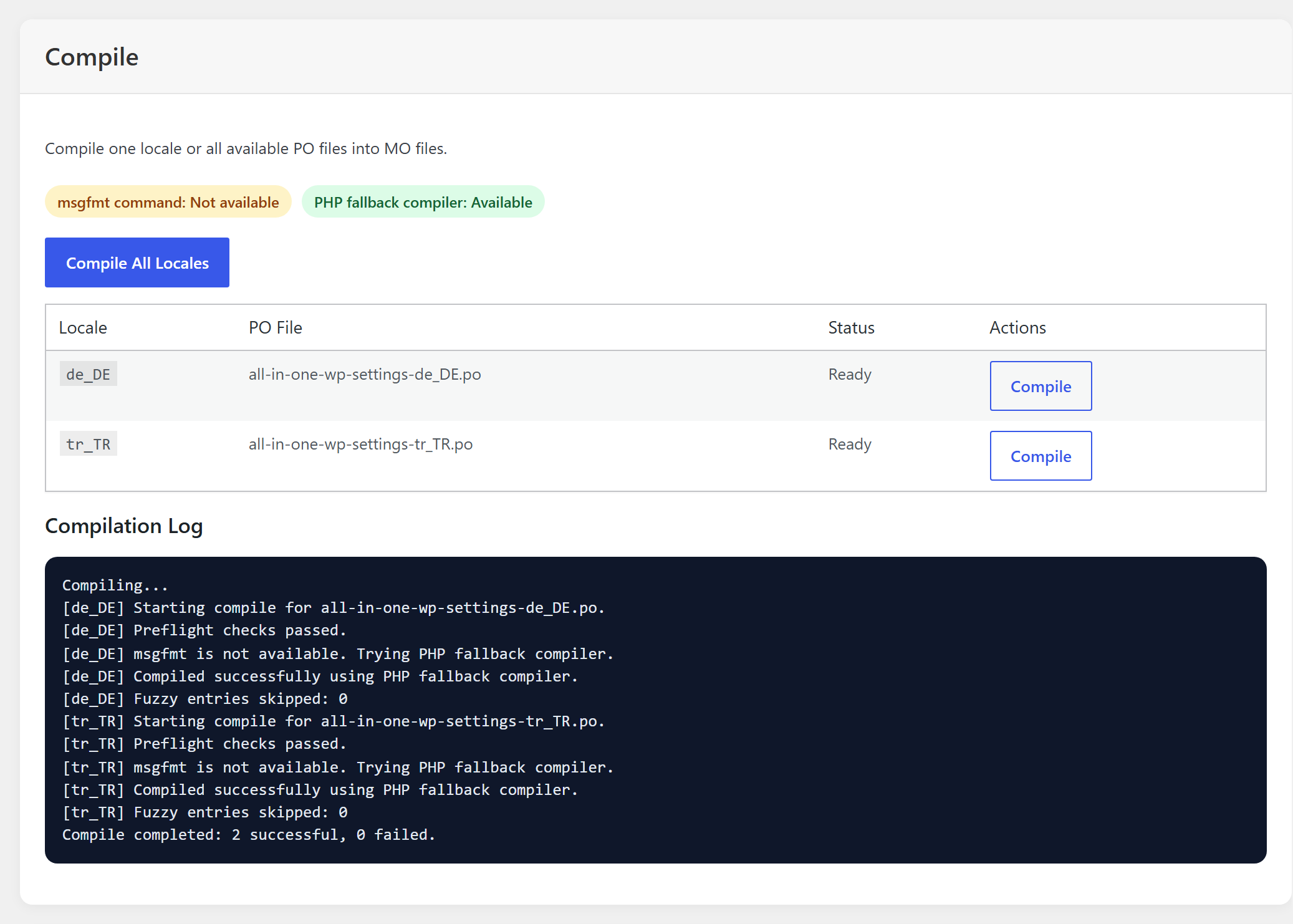
Its limits, stated plainly. It compiles only the files in AIOWS’s own languagesfolder. For another plugin’s or a theme’s PO file, use msgfmt, Poedit or WP-CLI as shown above. It writes MO files only, with no .l10n.phpand no JSON. It replaces the old MO file without keeping a copy, so download the old one first if you may want it back.
FAQ
Do I need to upload the PO file to the server?Not for WordPress. It reads only your MO and PHP files. Keep your PO file, because it is the only one you can edit.
Can I edit an MO file directly?No. It is a compiled binary. Edit your PO file and compile again.
I compiled the file, and nothing changed. What first?Look for a .l10n.phpfile of the same name. If it is older than your MO file, it is the one WordPress reads.
Why did my translation disappear after an update?A language pack replaced your file in wp-content/languages/plugins/. Keep your PO file elsewhere and recompile it.
Does the theme use the same process?Yes. You use wp-content/languages/themes/and your theme’s text domain.

