

You translated a plugin, your file is on the server, and your screen still shows English. Nothing is broken in the usual sense. WordPress looks for one file per plugin, chosen by your language, by the file name and by the folder. If one of the three is off by a single character, it says nothing and shows you English.
So don’t edit your translation yet. First find out which file WordPress is really reading for you, or whether it reads any at all. Every check below was run on a test site, with a small plugin that tags each string with the file it came from, so you can see what each mistake looks like.
Which language is WordPress asking for?
WordPress keeps two language settings, and your admin screens follow the one you may not think of:
| Setting | Where you find it | What it controls |
|---|---|---|
| Site language | Settings> General> Site Language | your public pages |
| Your profile language | Users> Profile> Language | every admin screen you see |
Set your site to German and your own profile to English, and you get what the test site showed: the plugin’s admin page in English, with a correct German file in place.
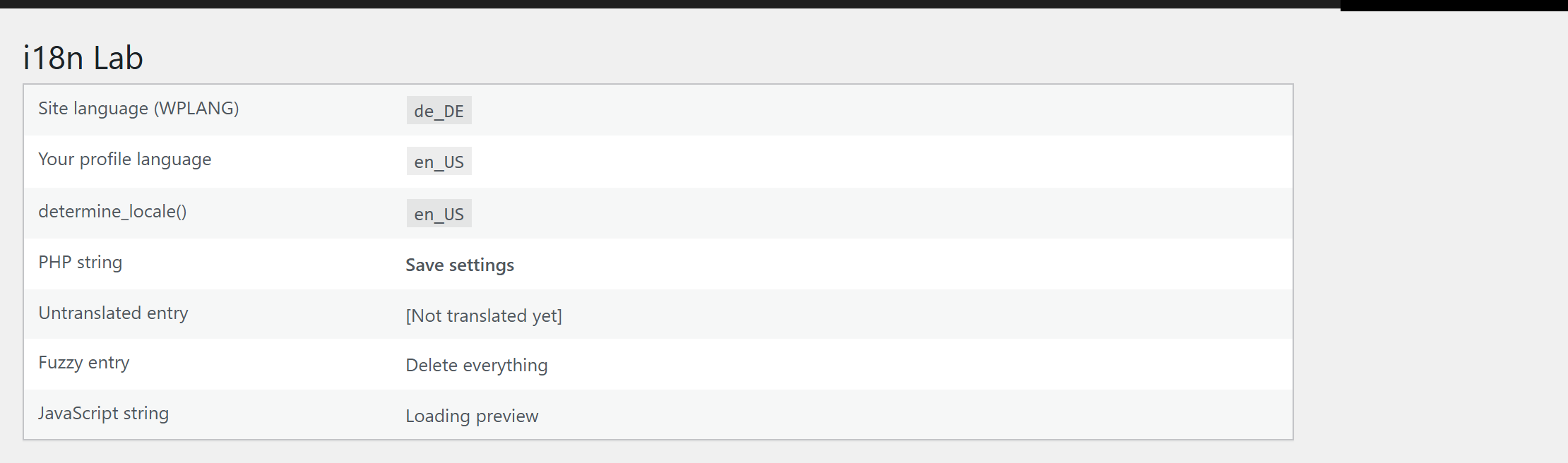
If your profile says Site Default, it follows the site language. If it names a language, that one wins on your admin screens, and only for you. Another administrator can see the same screen in a different language.
Is the file named for exactly that language?
A plugin’s translation file is named text-domain-locale.mo. The text domain is the plugin’s own identifier, normally its folder name. The locale is the full code WordPress uses, with no shortening:
| Your language setting | File WordPress looks for |
|---|---|
| English (United States) | none, English is built in |
| Deutsch | my-plugin-de_DE.mo |
| Deutsch (Sie) | my-plugin-de_DE_formal.mo |
| Türkçe | my-plugin-tr_TR.mo |
Two results from the test site show you how literal this is: – A file named -tr.mois ignored.With your language set to Turkish and only i18n-lab-tr.moin place, your page stays English. Rename it to i18n-lab-tr_TR.mo, and it turns Turkish. – There is no fallback between German variants.With Deutsch (Sie)set and only a de_DEfile, your page is English. A de_DE_formalfile fixes it.
If your plugin ships only de_DEand your site runs Deutsch (Sie), copy its de_DEfiles under the de_DE_formalname. Your readers get the informal form, but they get German.
A file in wp-content/languages wins
There are two places a plugin’s translation can come from: – wp-content/languages/plugins/, where WordPress puts the language packs it downloads from translate.wordpress.org; – the plugin’s own languagesfolder, which only counts if the plugin tells WordPress about it with load_plugin_textdomain().
WordPress checks wp-content/languages/plugins/first.Put the same string in both places, tagged by origin, and your page shows the language pack’s version. Edit the plugin’s own file as often as you like: nothing changes.
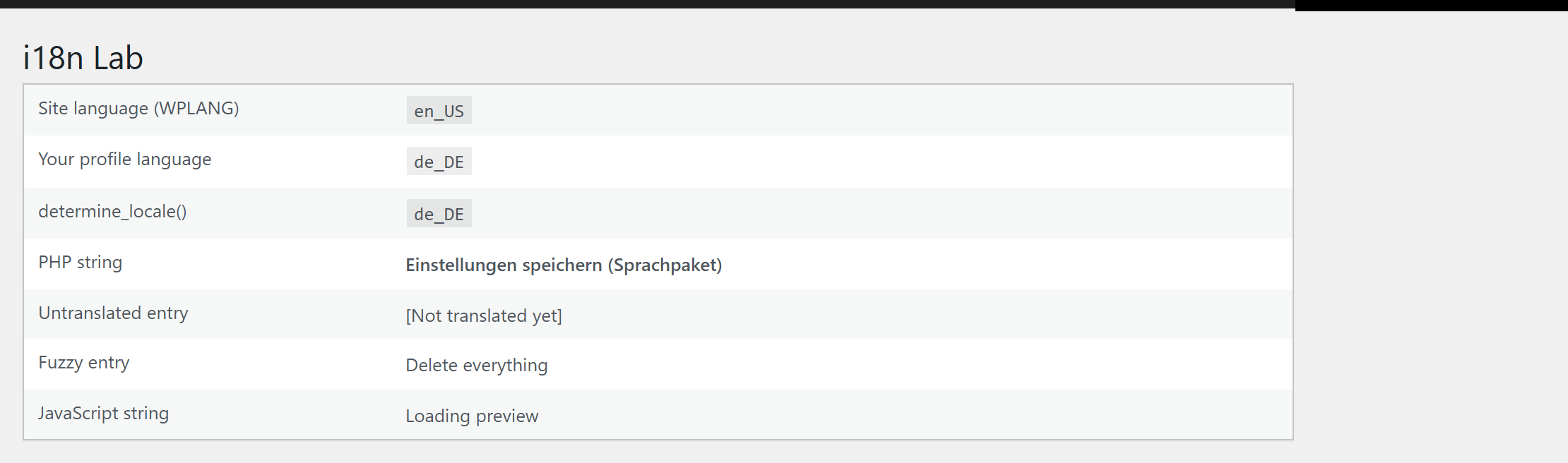
The reverse also holds. If your plugin never calls load_plugin_textdomain(), it is translated only from wp-content/languages/plugins/. Your file in its own folder stays English until you move it there.
Language packs come from translate.wordpress.org. A plugin gets its first pack in a language only once 90 % of its stable strings are translated there. Below that, the partial translation you can see on translate.wordpress.org does not reach your site.
How to compile a corrected file, and where to put it, is in how to compile WordPress PO files into MO files.
The .l10n.php file beside it
Since WordPress 6.5, a .l10n.phpfile with the same name as your .mofile is loaded instead of it. On the test site, a .l10n.phpbeside the language pack’s .mowon. So did one with no .monext to it.
If you edit and recompile a .mofile and nothing changes, look for a .l10n.phpof the same name. Regenerate it from your PO file with wp i18n make-php, or delete it so the .mofile is read.
One difference catches people out. msgfmtleaves entries marked fuzzy out of the .mofile, so they stay English. wp i18n make-phpin WP-CLI 2.12.0 kept the fuzzy entry, and the test page showed its unconfirmed translation. Clear the fuzzy flags you mean to keep before you build your PHP file, and leave the others untranslated.
Strings from JavaScript need their own file
Text that a script writes into your page never touches the .mofile. You need a JSON file named after the text domain, the locale and the MD5 hash of the script’s path inside the plugin, for example my-plugin-de_DE-0a1b2c….json. wp i18n make-jsonwrites it from your PO file, and your plugin must call wp_set_script_translations().
Two results from the test site are worth knowing: – Without the JSON file, your PHP string is German and your script’s string English, on the same screen. – With a language pack present, your JSON file in the plugin’s own folder is ignored, and your script’s string falls back to English. Put the JSON file next to the file that wins.
If your screen is half translated and half English, start here.
Code that translates too early
Since WordPress 6.7, a plugin that asks for a translation before the initaction triggers a notice in your debug log:
Translation loading for the my-plugin domain was triggered too early.
This is usually an indicator for some code in the plugin or theme running
too early. Translations should be loaded at the init action or later.
Turn on WP_DEBUG_LOGand search your wp-content/debug.logfor the plugin’s text domain.
On the test site, a string translated while the plugin’s file was loading stayed English, while the rest of your page was German. Your log has the notice.
You cannot fix this one with a file. Send the notice to the plugin’s author: the fix is to move that code to initor later.
Verification
You have found the cause when you can name the file that serves the string, and removing it changes the screen.
| Check | Expected |
|---|---|
| Open the screen with your profile language set to the language that fails | The language you expect. If not, see the first section. |
Rename the file you believe is serving, for example to .mo.off, and reload | Must change.The text falls back to English, or to another file’s version. |
| Put the name back and reload | The translation returns. |
| Check one PHP string and one JavaScript string on the same screen | Both translated. If only one is, see JavaScript. |
Search debug.logfor the text domain | No “triggered too early” line. |
The rename is the check that settles it for you. On the test site, renaming the language pack’s .moswitched the text to the plugin folder’s version. The file you were editing had never been the one on your screen.
If nothing changes when you rename your file, WordPress was not reading it. Look for a .l10n.phpfile, a second copy in another folder, or a page cache serving you an older copy.
When you rename the only .mofile, your PHP string turns English while your script’s string stays German. Each kind of string has its own file, so you check each one.
How AIOWS helps:
AIOWS Language Compiler
Language Compiler handles your AIOWS translations, and AIOWS loads them differently from the plugin in this article, so the traps above work out differently for you.
It reads its own folder first, on purpose.For the languages it ships, German and Turkish, AIOWS loads the file in its own languagesfolder and puts it in place of any language pack for its text domain in wp-content/languages/plugins/. An older pack there cannot hide strings a new AIOWS version shipped. On the test site, a planted pack with a different label, .moand .l10n.php, changed nothing on your AIOWS screens.
It does not leave you in English on Deutsch (Sie).For a German locale it has no file for, such as de_DE_formal, AIOWS gives you its de_DEtranslation.
It shows you what is missing.The Scan tab compares AIOWS’s code with each of your PO files. It reports translated, empty, duplicate and missing entries per locale. Read your Empty and Missing columns: they name what is missing, and the coverage figure never rounds a missing string up to 100 %.
It compiles safely without msgfmt.Compile turns your AIOWS PO files into MO files, with GNU msgfmtif your server allows it, otherwise with its own compiler. Both leave fuzzy and untranslated entries out, so an unfinished string shows you English, never a blank.
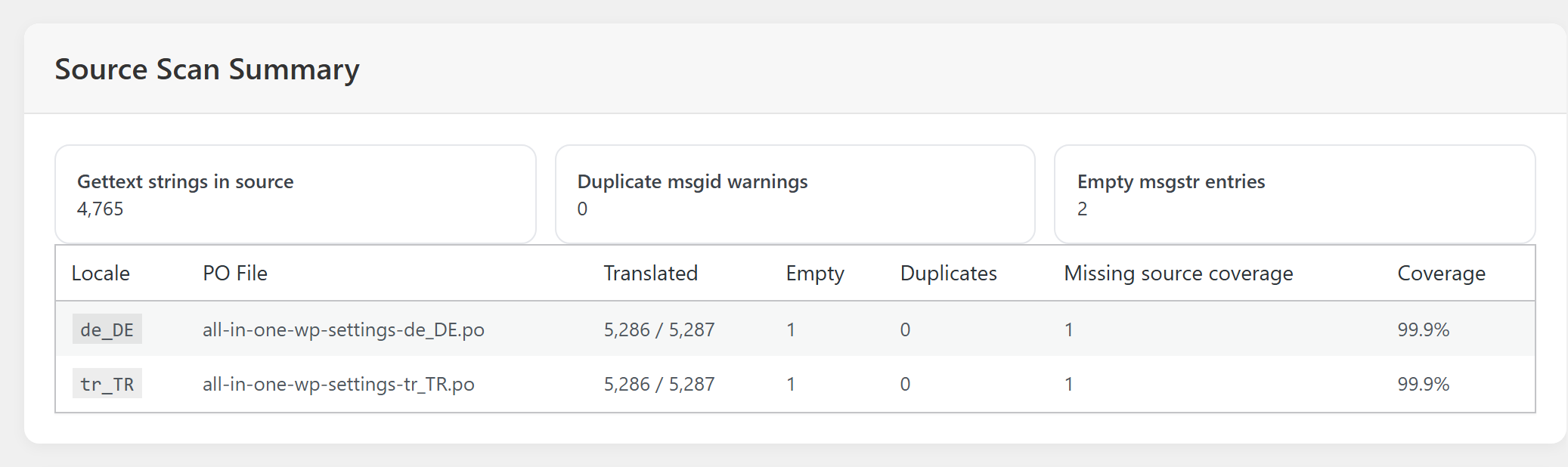
Its limits, stated plainly. It works on AIOWS’s own languagesfolder and nothing else. Your other plugins’ and your theme’s translations are yours to compile with msgfmt, Poedit or WP-CLI, as shown above. It writes .mofiles only, with no .l10n.phpand no JSON for scripts. And it does not diagnose how other plugins load: a profile language, a too-early call or a second copy of a file are yours to check with the verification above.
FAQ
I uploaded the translation and cleared the cache. Why is it still English?Check your profile language first, then the file name, then whether a file in wp-content/languages/plugins/wins over yours.
Can I keep my own translation when the plugin updates?A file in the plugin’s own folder goes when the plugin’s folder is replaced by an update. Keep your PO file somewhere else, and rebuild after updates.
Why is the plugin translated on the front end but not in my admin?Your profile language decides your admin, the site language your public pages.
Does WordPress fall back from de_DE_formalto de_DE?Not for plugins. AIOWS does this for itself; your other plugins need their own de_DE_formalfile.
Where do I see which strings are still untranslated?In your PO file, or in your editor’s list of untranslated entries. For AIOWS, the Scan tab counts them for you per language. More on reading language files is in how to scan and manage WordPress language files.
Sources
- Internationalization improvements in 6.7 — Make WordPress Core
- I18N Improvements in 6.5 (Performant Translations) — Make WordPress Core
- load_plugin_textdomain() — WordPress Developer Resources
- wp_set_script_translations() — WordPress Developer Resources
- Plugin/Theme Authors Guide — WordPress Polyglots Handbook

