
Cache Manager for WordPress
Cache Manager is the WordPress cache plugin layer inside AIOWS that speeds up your pages with page caching, minification, image optimization, and CDN support.
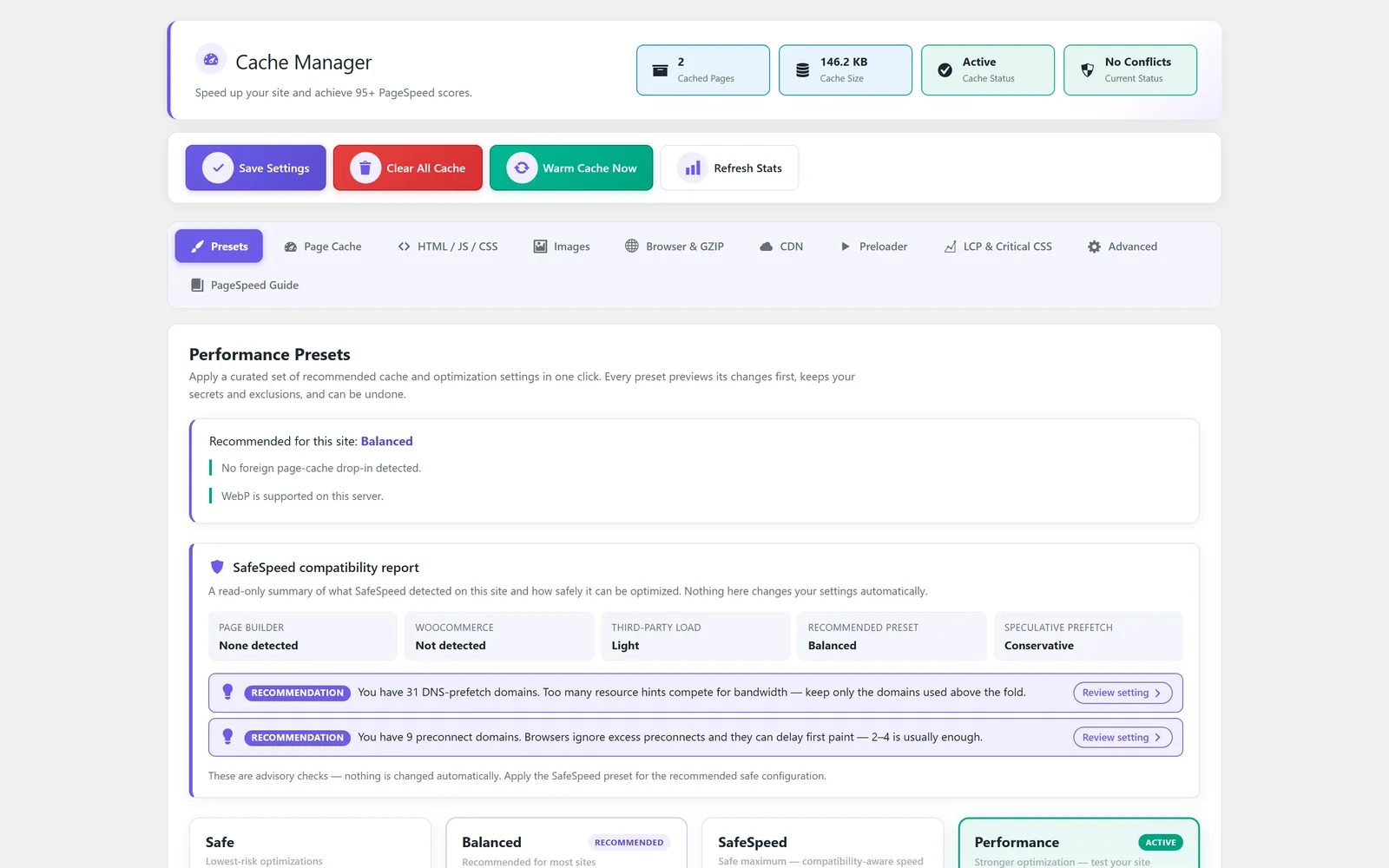
Faster WordPress pages from one performance dashboard
Cache Manager is the performance module of All-in-One WP Settings, giving you a complete WordPress cache plugin built into the same dashboard as your other settings. It tackles the common problem of slow pages by serving a cached copy of your content instead of rebuilding every request from scratch, while minifying HTML, CSS, and JavaScript and optimizing images so browsers download less. You get fine-grained exclusion controls so dynamic pages, carts, and account areas stay fresh, plus CDN and Cloudflare connections to push assets closer to your visitors. A cache preloader warms your key URLs in advance, and built-in PageSpeed guidance helps you decide what to tune next. The result is a single place to manage caching, asset delivery, and front-end optimization without bolting on a separate tool. Connecting one for the first time is a job of its own, and how to connect a CDN to WordPress walks through the steps. When Cloudflare and the page cache each hold a copy of the same page, they can disagree about which is current; WordPress cache and Cloudflare conflict, and how to fix it covers the symptoms and the order to clear them in.
Best for: Site owners, agencies, and shop managers who want faster WordPress pages from one dashboard, with safe exclusion rules for dynamic and commerce pages.
See Cache Manager in action
What you can do inside Cache Manager
- Page cache with exclusion controls so dynamic pages stay uncached
- HTML, CSS, and JavaScript minification and optimization
- Image optimization and lazy-loading to reduce page weight
- Browser cache and GZIP compression for repeat visitors
- CDN and Cloudflare connection for asset delivery
- Cache preloader that warms your key URLs ahead of visitors
- LCP and critical CSS controls for above-the-fold rendering
- Advanced cache rules for finer control over what gets cached
- Built-in PageSpeed guidance to help you decide what to tune
- Keep cart, checkout, and account pages out of the cache
Why Cache Manager matters
Speed without the guesswork
Page caching, minification, and image optimization work together, and the built-in PageSpeed guidance points you to the next sensible step instead of leaving you to guess.
Safe for dynamic and commerce sites
Exclusion controls and the option to keep cart, checkout, and account pages out of the cache mean shoppers see live data while everything else stays fast.
One dashboard, no extra plugin
Caching, CDN connection, and front-end optimization live alongside your other AIOWS settings, so you are not juggling a separate WordPress cache plugin and its own settings screen.
How teams use Cache Manager
-
Speed up a content or marketing site
Turn on page cache, minification, and image lazy-loading to cut load times for blog posts and landing pages, then warm them with the preloader.
-
Keep a store fast but accurate
Cache product and category pages while keeping cart, checkout, and account pages out of the cache so customers always see current totals.
-
Deliver assets through a CDN
Connect a CDN or Cloudflare and enable browser cache and GZIP compression so visitors load static files from a closer, faster source.
-
Tune above-the-fold rendering
Use LCP and critical CSS controls with advanced cache rules to improve how quickly the visible part of a page appears.
Cache Manager guides
Step-by-step articles on setup, configuration and common problems.
Good to know: Real-world results depend on your hosting, theme, and other plugins, so there is no guaranteed page-speed score.
Cache Manager FAQ
It is a full caching module. You get page cache, HTML, CSS, and JavaScript minification, image optimization, browser cache, GZIP compression, CDN and Cloudflare connection, a cache preloader, and advanced cache rules in one place.
No. You can keep cart, checkout, and account pages out of the cache, and exclusion controls let you mark any other dynamic page so it is never served from a stored copy.
Yes. Cache Manager includes CDN and Cloudflare connection so static assets can be delivered from a network closer to your visitors, alongside browser cache and GZIP compression.
The preloader warms your key URLs ahead of time, so the first visitor to an important page is more likely to receive an already-cached version instead of waiting for it to build.
It provides LCP and critical CSS controls and built-in PageSpeed guidance to help you tune above-the-fold rendering, but real-world scores still depend on your hosting, theme, and other plugins.
For most sites, no. Caching, minification, image optimization, and CDN settings all live in this module, so you can manage front-end performance without adding another WordPress cache plugin.
Yes — Cache Manager ships on every plan. Tiers differ only by the number of live production domains you can run (1, 3, or 5), never by which modules you get.
Cache Manager is included on every plan
Every plan includes all 15 modules. Choose a plan, then activate Cache Manager on your sites.