
Redirect Manager for WordPress
A WordPress redirect manager that lets you create, organize, and control 301 and pattern based redirects from one screen, so old links keep working.
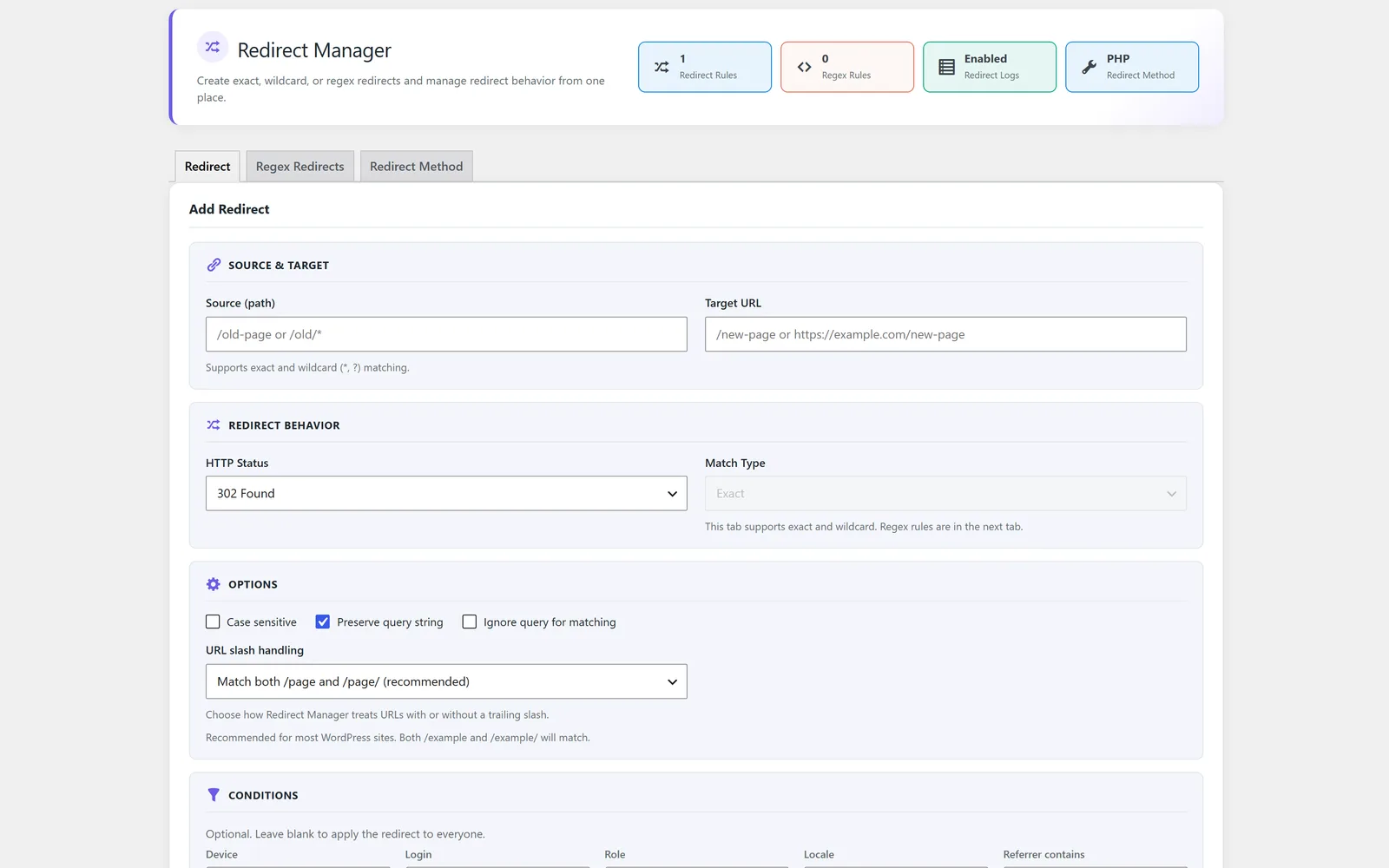
Manage WordPress redirects so old links keep working
Redirect Manager is the WordPress redirect manager inside All-in-One WP Settings that lets you point old or changed URLs to the right destination. When you rename a post, restructure your permalinks, retire a page, or move to HTTPS or a new domain, the old addresses can start returning errors and frustrate both visitors and search engines. With Redirect Manager you create exact one to one rules or pattern based rules that match many URLs at once, then choose how each redirect is handled. Every rule lives on one screen, so you can see, edit, and review your redirects in one place instead of digging through scattered settings. The result is a cleaner site where saved links, bookmarks, and indexed pages still lead somewhere useful.
Best for: Site owners, bloggers, and agencies who restructure content, fix broken links, or run HTTPS and domain migrations and need redirects they can manage without touching code.
See Redirect Manager in action
What you can do inside Redirect Manager
- Create exact redirect rules from one specific URL to a chosen destination
- Build regex and pattern redirects to match many URLs in a single rule
- Choose the redirect handling method that fits each rule
- Use 301 permanent redirects to signal that content has moved for good
- Manage every redirect rule from one central screen
- Handle permalink changes so renamed posts and pages still resolve
- Repair broken links by pointing dead paths to live destinations
- Support HTTPS or domain migrations by redirecting old addresses to new ones
Why Redirect Manager matters
Keep visitors from hitting dead ends
When a URL changes, old links can return errors. Redirects send people straight to the right page so they stay on your site instead of bouncing.
Protect the value of indexed pages
301 permanent redirects tell search engines that content has moved, helping pass along the standing of the original URL to its new home.
Stay in control as your site grows
Managing every rule from one screen means you can see what is redirecting where, review your rules, and adjust them quickly without guesswork.
How teams use Redirect Manager
-
Restructured permalinks
You change your permalink structure or rename posts. Pattern redirects map the old paths to the new ones so saved and indexed links keep working.
-
Cleaning up broken links
Retired or moved pages leave dead URLs behind. Exact rules point each broken path to a relevant live page instead of an error.
-
Moving to HTTPS or a new domain
During a switch to HTTPS or a domain change, redirects route old addresses to the new secure or branded location.
-
Pointing old paths to a current page
When several retired or moved URLs should now lead to one live page, you create exact or pattern rules that send each old path to that destination.
Redirect Manager guides
Step-by-step articles on setup, configuration and common problems.
Good to know: Redirect Manager works at the WordPress application level and does not edit your web server configuration files for you.
Redirect Manager FAQ
It is a tool for creating and controlling rules that send one URL to another. Redirect Manager lets you do this from a single screen without editing code.
An exact rule points one specific URL to one destination. A pattern or regex rule matches many URLs at once, which is useful when a whole section of paths needs to move.
A 301 is a permanent redirect and is the right choice when content has moved for good, since it signals the change to search engines as well as visitors.
Yes. Every redirect rule is managed from one screen so you can review, edit, and keep your rules organized.
Yes. You can redirect old addresses to their new locations, which pairs well with SSL Manager for HTTPS and Replace Manager for rewriting URLs in your content.
No. Redirect Manager operates at the WordPress application level and does not edit your web server configuration files for you.
Yes — Redirect Manager ships on every plan. Tiers differ only by the number of live production domains you can run (1, 3, or 5), never by which modules you get.
Redirect Manager is included on every plan
Every plan includes all 15 modules. Choose a plan, then activate Redirect Manager on your sites.