
SMTP Manager for WordPress
A WordPress SMTP plugin that routes every site email through authenticated SMTP, with logs, a retry queue, and a delivery dashboard.
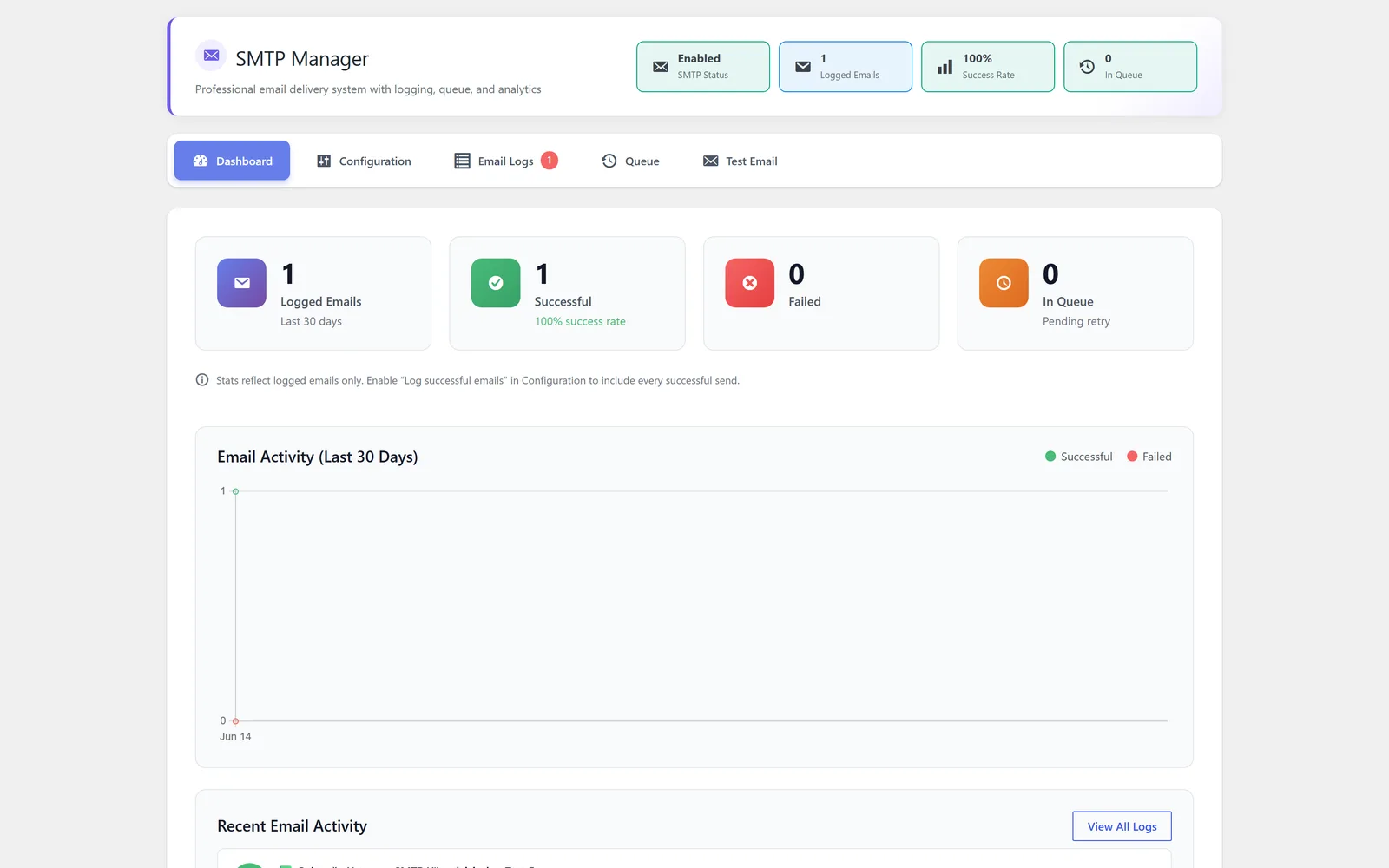
Reliable WordPress email delivery through authenticated SMTP
SMTP Manager is the module in All-in-One WP Settings that takes over how WordPress sends email. By default WordPress hands mail to the server PHP mail function, which is often unauthenticated and frequently lands in spam or never arrives. SMTP Manager fixes that by routing every WordPress email through an authenticated SMTP account you provide, so messages are sent the way modern mailbox and transactional providers expect. You configure the host, port, and encryption, authenticate with a username and password or with OAuth, and then watch delivery through a status dashboard and email logs. A sending queue processes outgoing mail with retries so a brief hiccup does not silently lose a message. The value is simple: more of your WordPress email actually reaches the inbox, and you can see what happened to each message. When the encryption mode and the server certificate disagree, the connection fails before authentication begins; how to fix SMTP SSL and TLS certificate errors in WordPress separates the hostname, chain, clock and STARTTLS cases.
Best for: Site owners and agencies who need reliable WordPress email delivery for order receipts, account notices, and form replies, and who want visibility into what was sent and whether it went through.
See SMTP Manager in action
What you can do inside SMTP Manager
- Route every WordPress email through an authenticated SMTP connection instead of the default PHP mail function
- Configure the provider host, port, and encryption to match your mail service
- Authenticate with a username and password or with OAuth
- Work with common transactional and mailbox SMTP providers
- Monitor outgoing mail with a delivery status dashboard
- Keep email logs of messages that were sent
- Process outgoing mail through a sending queue that retries on failure
- Verify the connection with a built-in test email tool before going live
Why SMTP Manager matters
Default WordPress mail is unreliable
The built-in PHP mail function is often unauthenticated, so important messages like receipts and password resets get filtered or dropped. Routing through authenticated SMTP gives your email a far better chance of arriving.
You can see what happened
The delivery status dashboard and email logs turn email from a black box into something you can inspect, so when a customer says they never got a message you can check the record instead of guessing.
Transient failures do not lose mail
The sending queue processes outgoing messages with retries, so a momentary provider or network problem does not silently swallow a message that should have been delivered.
How teams use SMTP Manager
-
Deliver WooCommerce and order emails
Route order confirmations, shipping notices, and account emails through your SMTP provider so customers reliably receive transactional mail.
-
Fix contact and lead form replies
Send form notifications and autoresponses through authenticated SMTP so inquiries reach your team and acknowledgements reach the visitor.
-
Confirm setup before launch
Use the test email tool to verify the host, port, encryption, and credentials are correct before a new site or migration goes live, avoiding a launch with broken email.
-
Diagnose missing messages
When a user reports a missing email, open the email logs and delivery dashboard to confirm whether the message was sent and what the outcome was.
SMTP Manager guides
Step-by-step articles on setup, configuration and common problems.
Good to know: SMTP Manager sends through an SMTP account you provide. It improves how mail leaves your site, but final deliverability also depends on your DNS, your provider, and your sending reputation, so it cannot guarantee that every message lands in the inbox.
SMTP Manager FAQ
It routes every WordPress email through an authenticated SMTP connection that you configure, instead of relying on the default PHP mail function that is often unauthenticated and unreliable.
Yes. You can authenticate with a username and password, or with OAuth, depending on what your SMTP provider supports.
It works with common transactional and mailbox SMTP providers. You supply the host, port, encryption, and credentials for the service you already use.
Use the built-in test email tool to verify the connection. It lets you confirm the host, port, encryption, and authentication work before you depend on them in production.
Outgoing mail is processed through a sending queue that retries, so a brief provider or network problem does not silently lose the message. You can review outcomes in the email logs and delivery status dashboard.
No. It sends through an SMTP account you provide and improves how mail leaves your site, but final deliverability also depends on your DNS, your provider, and your sending reputation.
Yes — SMTP Manager ships on every plan. Tiers differ only by the number of live production domains you can run (1, 3, or 5), never by which modules you get.
SMTP Manager is included on every plan
Every plan includes all 15 modules. Choose a plan, then activate SMTP Manager on your sites.